Send mail using the University's postal services
Updated on: 10 December 2025
The Mailroom provides comprehensive mail and postal services to Schools, Professional Service Units and Departments.
Opening hours
- Monday to Friday: 8am to 5pm
- Saturday and Sunday: closed
Royal Mail delivers to the Mailroom each morning and collects the outgoing mail in the afternoon.
You can email mailroom@st-andrews.ac.uk for advice or questions about any of the University mail services mentioned on this page.
Same-day posting
Deadline for last post is 4pm at the Mailroom.
The Mailroom driver collects and delivers mail from most Schools and Professional Service Units once a day. Delivery times are available on request.
Mailroom services
Letters within the UK
| Service | Delivery | Insurance | Signed for |
|---|---|---|---|
| First class | 1 to 2 working days | None | No |
| Second class | 3 to 5 working days | None | No |
| First class recorded | 1 to 2 working days | None | Yes |
| Special delivery | 1pm next working day | Up to £500 | Yes |
Letters outside the UK
| Service | Delivery | Insurance | Signed for |
|---|---|---|---|
| Airmail – Western Europe | 3 to 4 days | None | No |
| Airmail – Eastern Europe | 5 to 6 days | None | No |
| Airmail – Rest of the world | 7 to 10 days | None | No |
| International Signed for – Western Europe | 3 days | Up to £50 | Yes |
| International Signed for – Eastern Europe | 4 days | Up to £50 | Yes |
| International Signed for – Rest of the world | 5 days | Up to £50 | Yes |
The Mailroom also provides a UK and abroad DHL service for letters and parcels.
Parcels
The Mailroom offers a full range of Parcelforce delivery services for items of up to 30 kg within the UK:
- Parcelforce 24
- Parcelforce 48
- AM next working day
- 9am next working day
The Mailroom can help you find the most efficient and cost-effective way to get your item where it needs to go.
Sending items abroad
To help the Mailroom process your item efficiently, you must attach a note to your item describing the contents of the package or envelope. This allows the item to clear customs.
DHL
You can send individual items of up to 75kg or multiple items up to 100kg by DHL.
DHL collect and deliver around lunchtime, so for items to go out on the same day, the Mailroom needs to have them in the morning of that day to have enough time to process them for collection.
Some departments have a DHL account. If your department doesn't have an account, you can send items through DHL by contacting the Mailroom.
To send items abroad, you must provide the following details:
- Contact name and telephone number at the destination
- A description of the contents of the package
To allow electrical items to clear customs, you must also include:
- A full description and model of the item
- Serial numbers and place of manufacture
If you have a question or need more information, please phone extension 3981.
Personal deliveries
The purpose of the Mailroom is to provide an internal and external postal service for the University of St Andrews.
When ordering and collecting personal items, you should know that the Mailroom receives deliveries from Royal Mail and encourages staff to collect personal items from Amazon lockers at the University Library and David Russell Apartments. If it's not clear whether your item is personal, you may be asked to collect your item from the Mailroom.
You must provide the correct address and contact phone number if you order your item by courier, as it'll be delivered to the address shown on the package. If the courier can't access the building or contact the recipient, the item could be returned to the sender, or it may be lost if it's left at that address.
Search for full postal addresses for:
All items delivered to the Mailroom will be examined
The Mailroom team will use their discretion to decide if items are work-related. If the item is of a personal nature, the Mailroom will email you to advise you that a package has been delivered for you, and you will need to collect the parcel from the Mailroom within 48 hours.
If you can't collect the parcel, you can nominate a person to collect it on your behalf. You must notify the Mailroom in advance.
Parcels will only be handed over to the addressee as detailed on the parcel, or the confirmed nominated person. Items not collected within the 48-hour time frame will be returned to the sender.
If you have any questions, please email mailroom@st-andrews.ac.uk.
Addressing your mail correctly
Many Schools and Units are spread over different locations. To help the Mailroom team deliver the mail to the right place, please address your internal mail as fully as possible, including the names of the Departments and buildings concerned.
If you are sending mail to Walter Bower House, make sure the name of the Department is clearly shown on the mail so it can reach the correct locker.
Student mail
The Mailroom does not deal with student mail. All student mail should be addressed to the relevant hall of residence.
Sending national and international mail
Address your mail correctly by:
- providing a postcode for UK mail
- clearly showing the destination country for international mail
Mail is sent out second class unless the envelope is marked to be sent as first class.
National mail
The Mailroom can use the following services to allow you to send mail in the UK:
- Signed for
- Special Delivery
- Courier
International mail
International mail will be sent by Airmail but can also be tracked or sent by courier.
You can contact the Mailroom to request a form where you can specify how you want to send your mail. The Mailroom can then return the form to you, confirming the cost and any tracking details.
International letters should have a blue Airmail sticker attached to the top left-hand corner of the letter. Please contact the Mailroom to request stickers.
All non-document items going abroad require a customs label. Make sure to complete the appropriate label before the item is collected for posting:
- Items with a value below £270 require a CN22 label
- Items with a value of more than £270 require a CN23 label
Your Department may already have these labels, but you can also request them from the Mailroom.
Packages of more than 2kg
These will be sent by courier and you must provide additional information for customs. Please contact the Mailroom to request the form you should complete to provide full details of the package contents. The Mailroom will then arrange the shipment and submit the customs information.
Bulk mailing
If your School or Unit is preparing a bulk mailing, you should:
- contact the Mailroom two days before posting, to help the Mailroom process the mail efficiently
- keep all addresses facing the same way up
Charges
There are no additional charges for Mailroom services. The cost of postage is recharged to Schools and Units using the appropriate cost centre coding.
Preparing outgoing departmental mail
To help the Mailroom provide a fast and efficient mail service, please follow these steps when preparing your internal and outgoing mail:
Internal mail
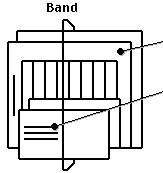
- Sort by size and then band together
- Address clearly, including:
- Name
- Department
- Building
Outgoing mail
Mail for franking
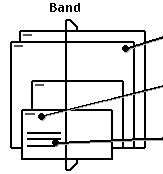
- Separate classes and sort by size
- Band each class separately
- Write the service required, for example, First or Second class, Recorded, Special Delivery, Airsure, International Signed For
- Address the envelopes clearly and include the postcode
For international mail, you can either:
- attach a blue Airmail sticker to the top left-hand corner of the envelope
- write Airmail
Airmail sent out from the University no longer needs to be separated into Europe and Rest of the world. This is part of the special Priority service provided to the University by Royal Mail.
For tracking purposes, the Mailroom keeps a record of the address and ID number of any mail requiring special services like Recorded Delivery, Special Delivery, and similar.
Bulk mailing
You must give a two-day notice to the Mailroom before any outgoing bulk mailings.
- Mark the boxes or mail sacks clearly with the account number to be charged and how you want the mail to be sent, for example, First or Second class, Airmail, or similar
- Separate by size and class
Stamped mail
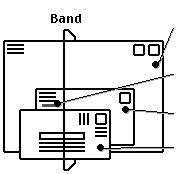
- Sort large envelopes to the back and small to the front, then band together
- Make sure a blue Airmail sticker is attached, or write Airmail on the letter
For international mail, please include the name of the country. Some countries require a green customs form.
Forwarding mail
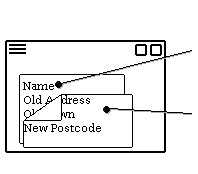
- Make sure the recipient's name is clearly visible after covering the old address
- Mail from outside the UK can be forwarded back out of the UK
- Mail from the UK cannot be forwarded outside the UK without charging your account
UK parcel
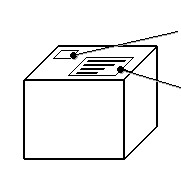
- Write the UK service you require, for example, 48hr, 24hr, 12 noon, 10am or 9am.
- Address the parcel clearly, including:
- Name
- Address
- Town
- Postcode
International parcels
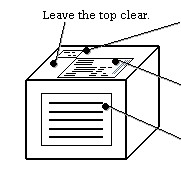
- Write the service you require, for example, International Data Post or Euro 48
- Complete the Parcelforce Worldwide document and attach it to the parcel
- Address the parcel clearly on two sides