Transfer grades from Moodle into MMS
Updated on: 9 December 2025
Procedure for exporting grades from Moodle and importing them into the Module Management System (MMS).
Set up MMS coursework submission tool
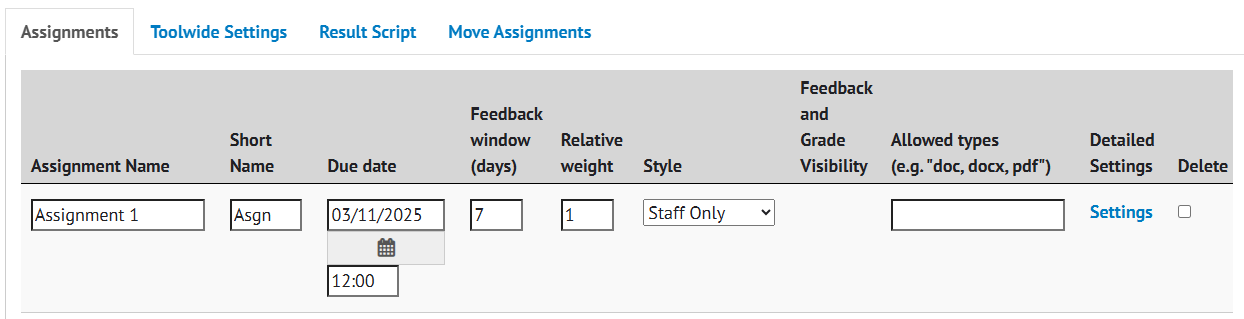
In MMS, in either a new or existing Coursework submission tool:
- Navigate to the Configure screen.
- Select Add Assignment.
- Set up as required ensuring that Style is set to Staff Only.
- Select Save Assignments.
Moodle grade export
On your module Moodle course:
1. Open the gradebook by clicking on the Grades tab.

2. Click on Grader report and select Export from the menu.

Alternatively, select Export from the administration block. Choose Excel spreadsheet.
3. You will be presented with a list of the gradable activities on your course. Deselect all and then choose the activity you wish to export.

4. Click Export at the bottom of the screen. The file will be generated and downloaded.

Prepare data for upload
Before importing into MMS, you must remove some data from the file.
1. Hold the CTRL key and select all columns except Student ID and the column containing the activity grades. Delete the selected columns.

2. Delete the row containing column headings.

Ensure the final grade value aligns with the marking scale configured for the assignment. If conversions are required, please calculate before uploading.
3. Save and close the file.
Import grades into MMS
In MMS:
1. Select Settings under the Detailed Settings column for the appropriate assignment.
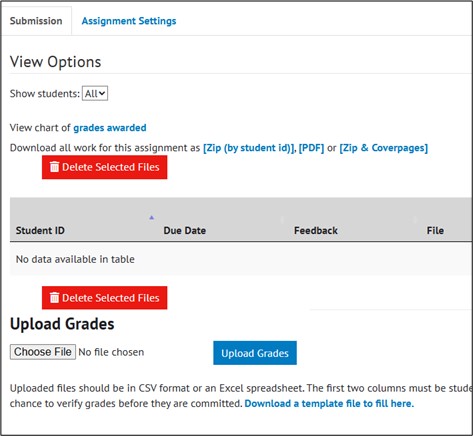
2. In the upload grades section, select Choose File.
3. Select the .csv file and then select Upload Grades. Once uploaded, a verification screen will be displayed.
If everything looks correct, select Submit Grades.