How to access the core student training modules
You will gain access to the modules at the appropriate time during the matriculation process. The modules will then appear as tasks in your online matriculation.
Once this happens, you may then follow the instructions below to navigate to the Core Student Training course which contains the modules.
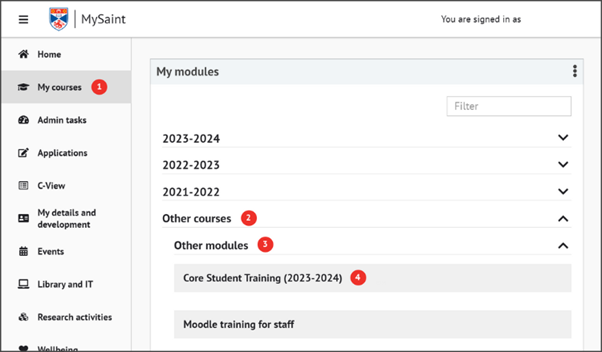
- Login to MySaint and select ‘My courses’ in the left-hand menu.
- In the ‘My modules’ portlet, click on the ‘Other courses’ title to expand the section.
- Select ‘Other modules’ then locate the course called ‘Core Student Training’ in the list.
- Click on the course to be taken to the modules you’re being asked to complete.
If you have any difficulties accessing or completing the modules once they appear in your online matriculation, contact itservicedesk@st-andrews.ac.uk.